

Freight Security Solutions for Shippers
Before freight leaves your dock, know which driver and truck are expected. CargoGuard brings driver checks, pickup photos, shipment tracking, and delivery documents together so your team and logistics partners can review the evidence from pickup through delivery.
Pickup Photos. Delivery Records.
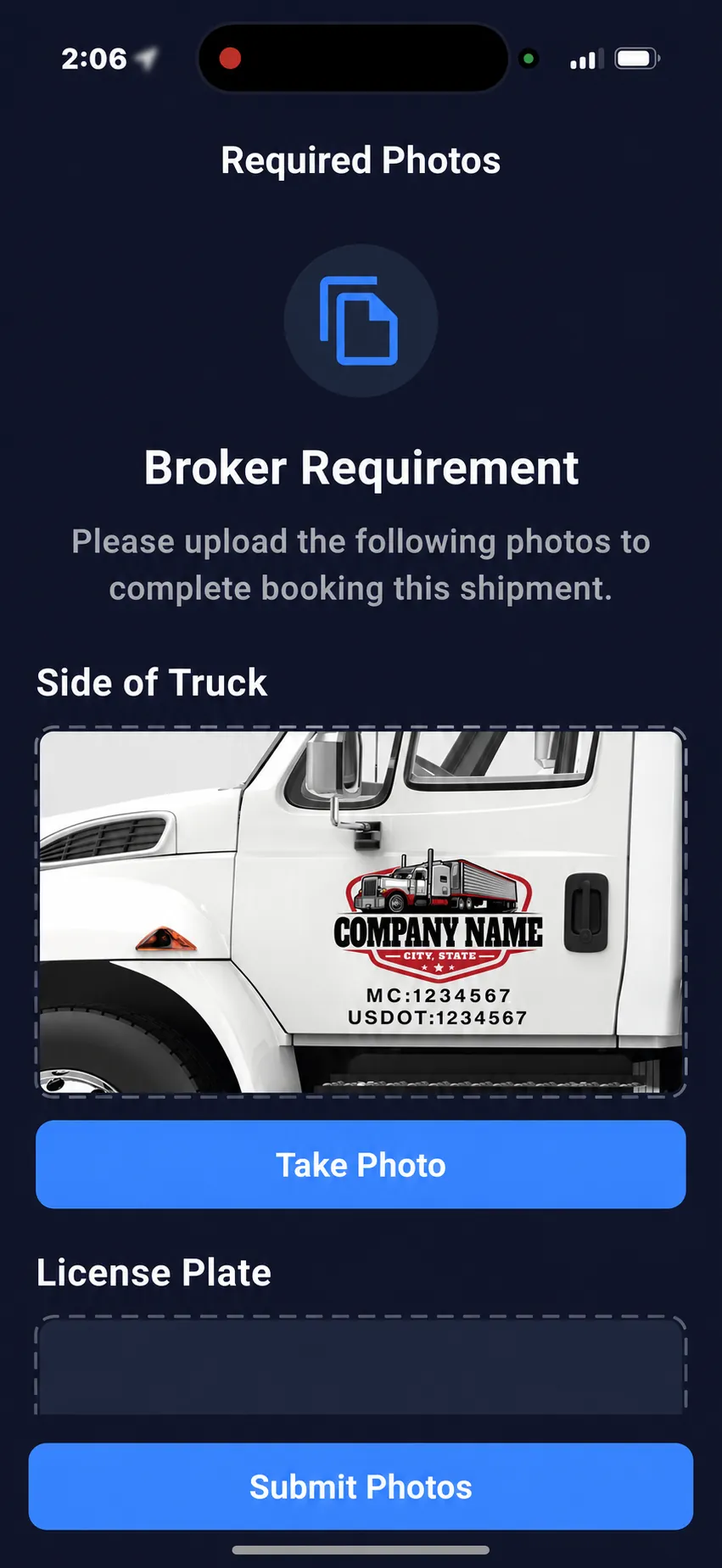
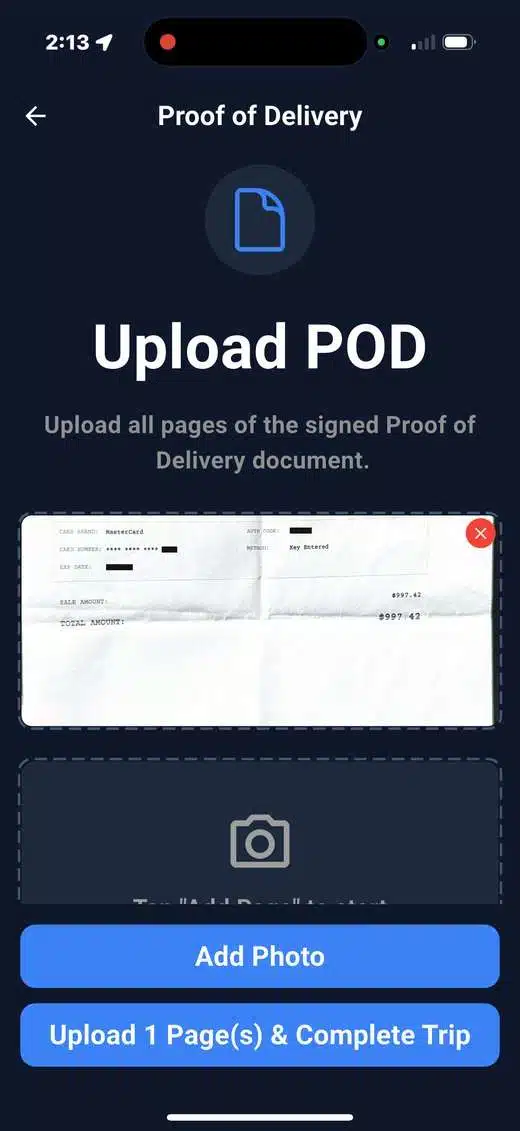
These actual CargoGuard driver-app screens show a pickup photo checklist and an uploaded delivery document. Connect what the driver submits with the shipment your team is reviewing. Select a screen to view it full size.
Freight Security Starts Before Release
Shipper freight security connects the expected pickup assignment with the person and equipment that actually arrive, then preserves the records of the shipment. CargoGuard supports that review with driver information, truck photos, tracking, and delivery documents. Your designated staff still decide whether freight should be released.
The checklist below is a recommended facility procedure, not an automatic CargoGuard gate-control feature. Agree on it with your broker or carrier before the pickup appointment, including who can approve a change and who handles after-hours questions.
Before Release: Four Checks at the Dock
1. Confirm the authorized pickup assignment
Match the load reference, pickup appointment, expected carrier, and delivery instructions with your shipping records. Confirm any last-minute change through an established contact. Knowing a pickup number alone does not establish that the arriving person is authorized to collect the freight.
2. Compare the driver with the assignment
Review the available driver verification information, including license details and selfie checks, with the person expected for that load. Resolve a changed driver before release. An identity check and permission to pick up a particular shipment are separate questions.
3. Compare the truck and trailer
Check carrier markings, vehicle identifiers, and tractor and trailer plates against the authorized assignment. Review the truck and license plate photos and their available capture details. A mismatch calls for clarification; do not assume a different marking automatically proves fraud.
4. Record the release decision
Record the arrival, the checks performed, any discrepancy, who resolved it, and who authorized release in your facility records. Keep those records associated with the load reference. Do not confuse a completed upload or an arrival event with a documented release decision.
FMCSA recommends confirming broker and carrier phone numbers through SAFER, checking the arriving truck against the contracted carrier, and retaining driver and vehicle logs and truck photos. Read its broker and carrier fraud guidance for the original recommendations.
When Details Change, Pause and Confirm
A substitute driver, different truck, or changed destination needs a clear explanation and approval under your procedures. Contact the assigned broker or carrier using a previously verified number, rather than relying only on contact details supplied with the change. Tell the dock team whether release remains on hold and document the outcome.
CargoGuard’s double brokering prevention workflow and cargo theft prevention guidance connect these checks with the wider shipment review. Additional evidence helps staff investigate; it does not remove the need for carrier vetting or facility controls.
After Pickup: Follow the Load
Review shipment status, the latest location timestamp, and available history in the freight visibility platform. Agree with your logistics partner who follows up on delays and missing updates. Tracking depends on active participation, device permissions, and connectivity; an old map position is not a current location confirmation.
Review shipment alerts alongside the load record. Confirm available notification channels and recipients during setup. A tracking interruption or GPS concern requires follow-up, not an automatic conclusion that theft has occurred.
At Delivery: Reconcile the Evidence
Keep the bill of lading, pickup photos, and proof of delivery connected to the correct shipment. Drivers can capture documents through the mobile driver app, with document capture supporting the load record. Check that the document is readable, references the right load, and includes the required signatures or delivery notes.
An arrival update indicates a recorded location or status; proof of delivery documents a receiving event. Review missing paperwork or reported damage and shortages with the appropriate parties before treating the record as complete. Agree on access, retention, and export needs, and share driver information only with authorized recipients.
Fit CargoGuard to Your Shipping Operation
Bring one pickup process and one logistics partner to the demo. Walk through who collects the photos, who reviews driver information, who authorizes release, and who follows up after dispatch. Confirm the account access and sharing arrangement rather than assuming a dedicated shipper portal or an automatic gate integration.
For system connections, review the freight tracking API with your technical team. Confirm supported data, event notifications, authentication, and testing before implementation. The broker workflow and 3PL workflow explain the partner side of the process.
Shipper Freight Security Questions, Answered
What should a shipper verify before releasing freight?
Confirm the shipment and authorized carrier, compare the arriving driver and equipment with the assignment, resolve discrepancies through verified contacts, and record the release decision. CargoGuard supplies supporting driver information, photos, and shipment records for that review.
Is a pickup number enough to authorize a driver?
No. A pickup reference identifies a load but does not independently establish who is authorized to collect it. Compare the driver and truck with the approved assignment and follow your facility’s release procedures.
Does a passed identity check automatically approve pickup?
No. Identity verification and authorization for a particular load are different checks. Your designated staff should confirm the assignment and resolve any driver or equipment change before release.
What should we do if a different truck arrives?
Pause release approval and confirm the change through an established broker or carrier contact. Record the explanation and approval in your facility records. Different equipment warrants verification, not an automatic accusation against the driver.
Can we use CargoGuard with our existing broker or 3PL?
Bring your logistics partner and current workflow to the demo. Agree on driver participation, evidence collection, access, notifications, and integration needs. Confirm the supported arrangement before rollout.
What happens if shipment tracking stops?
Check the last update time and ask the responsible logistics partner to confirm the shipment’s status with the driver or carrier. Device permissions or connectivity may interrupt updates. Keep unresolved concerns open for follow-up rather than assuming the last position is current.
Is an arrival alert the same as proof of delivery?
No. An arrival alert and a delivery document provide different evidence. Review the receiving record, correct shipment reference, signatures, and reported exceptions instead of closing the load solely on a location update.
Can CargoGuard guarantee that cargo theft is prevented?
No platform can guarantee that every theft or fraud attempt will be prevented. CargoGuard provides additional checks and shipment evidence to support your security process, alongside carrier vetting, facility procedures, and timely investigation.
Bring Your Pickup Process. See the Difference.
Walk through the driver checks, truck photos, tracking updates, and delivery records your shipping team needs. Bring your broker, carrier, or 3PL questions to a CargoGuard demo.