

High-Value Cargo Protection Solutions
High-value cargo protection needs more than a moving dot on a map. CargoGuard connects driver checks, truck photos, shipment tracking, and delivery documents so your team can verify the pickup, investigate changes, and keep the evidence with the load.
See the Shipment Behind the Alert
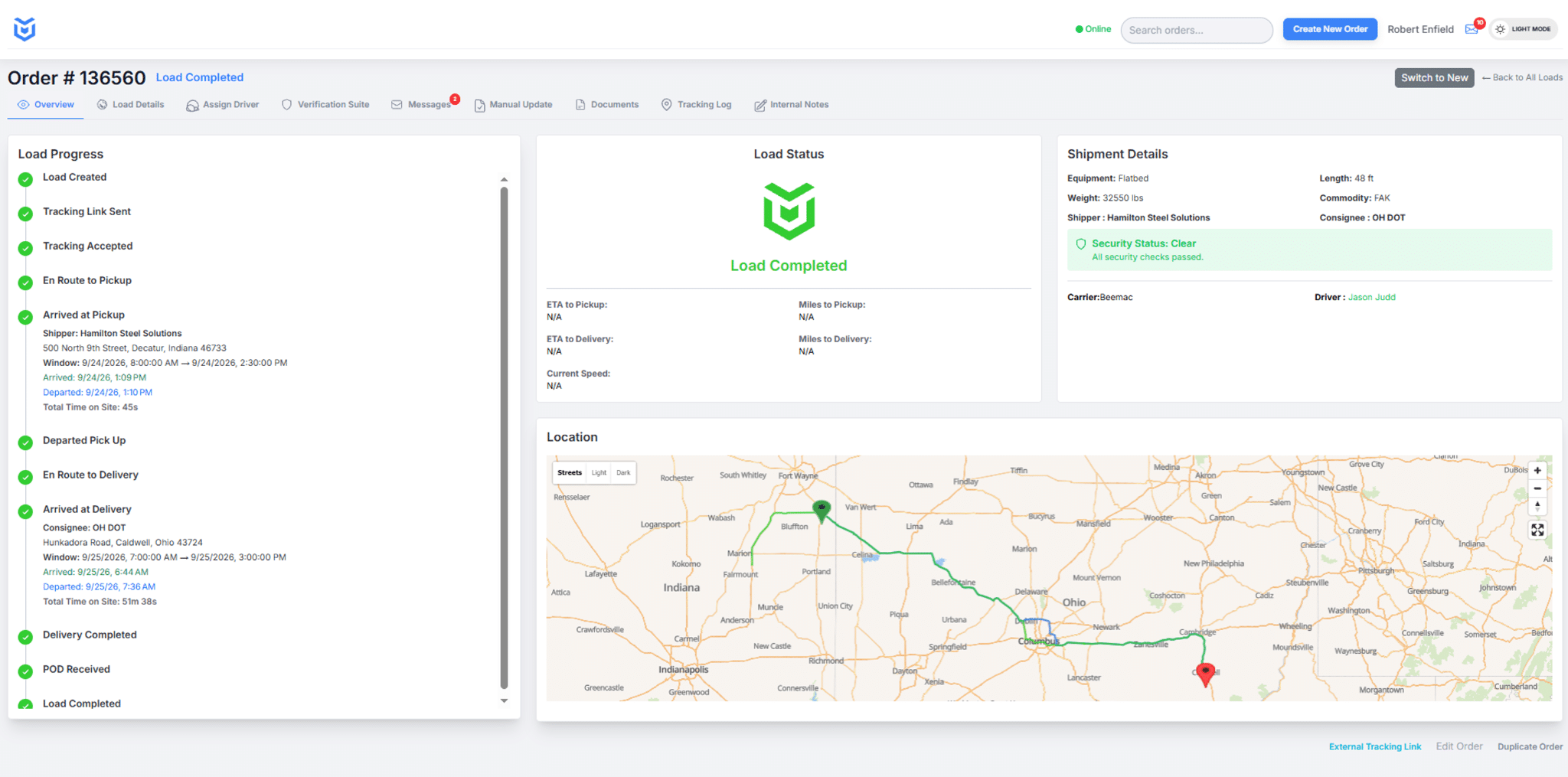
Use the CargoGuard workspace to review load progress, driver and carrier details, security status, and the route map together. Give the person investigating an exception the shipment context, not just a notification.
Match the Controls to the Shipment
Plan closer oversight around cargo value, replacement difficulty, customer requirements, and the consequences of a missed delivery. Electronics, automotive components, luxury goods, and pharmaceuticals are examples to discuss with your security team. A shipment plan should define the required evidence, approved contacts, and response responsibilities before dispatch.
CargoGuard supports the verification, tracking, and record-collection parts of that plan. The operating procedures below complement your carrier vetting and physical security measures; they are not automatic gate controls or a staffed recovery service.
Before Dispatch: Agree on the Load Plan
Confirm the authorized carrier and driver, pickup and delivery locations, required pickup photos, and the person who approves changes. Agree on planned stops, parking requirements, and after-hours contacts with the carrier and shipper. Keep sensitive route, commodity, and shipment-value details limited to people who need them for the job.
Assign a primary contact and backup for unresolved alerts. Decide how a missed check-in, changed destination, or missing tracking update will be investigated, including when the next follow-up is due. A written response plan gives the next shift something more useful than an unread notification.
At Pickup: Verify the Handoff
Review driver license details, selfie checks, and truck registration against the approved assignment. Compare truck and license plate photos with the equipment that arrives. Check the available capture dates, times, and locations, and resolve a substitution before authorizing release.
FMCSA recommends confirming broker and carrier phone numbers through SAFER, checking the arriving truck against the contracted carrier, and retaining driver and vehicle records. Its broker and carrier fraud guidance explains these checks. A passed identity check does not by itself authorize pickup of a particular load.
Record any discrepancy, the verified contact who resolved it, and the authorized release decision in your operating records. The shipper pickup checklist and double brokering prevention workflow cover the handoff in more detail.
In Transit: Check the Latest Evidence
Review the latest location timestamp, shipment status, and available route history in the freight visibility platform. Tracking depends on active participation, device permissions, and connectivity. An old position is not confirmation of where the truck is now.
Check shipment alerts and GPS integrity checks against the load record and follow up with the driver or carrier. Confirm update frequency, notification channels, recipients, and escalation settings for your account during setup. A gap or alert calls for investigation, not an automatic finding of theft.
When Instructions Change, Verify the Source
Treat a new delivery address or an unexpected request to transfer the load as a change requiring authorization. Confirm it through a previously verified broker, carrier, or shipper contact, not only the number supplied in the new message. Preserve the request and record the approval or refusal in your operational records.
Example for team training: A message asks the driver to deliver to a different warehouse. The operations team calls the established customer contact, confirms the authorized destination, and gives the driver verified instructions. This is a suggested response procedure, not a customer case study or an automated CargoGuard control.
At Delivery: Keep the Record Complete
Keep pickup photos, captured bills of lading, and proof of delivery associated with the correct load. Compare shipment documents with the load status timeline. Check reference numbers, signatures, readability, and any reported shortage or damage; an arrival update alone does not complete the delivery record.
For an unresolved incident, preserve original messages, available tracking history, photos, documents, and contact attempts. Follow your incident-response procedure and prioritize driver safety. FMCSA’s fraud guidance identifies reporting channels, including local police and the FBI’s Internet Crime Complaint Center. Keep personal driver information restricted to authorized recipients.
Test Your Requirements Before Rollout
Bring one sensitive-shipment workflow to a demo. Test pickup verification, an interrupted tracking session, a changed delivery instruction, and document review. Agree on who handles each exception and what your team needs to see before closing it.
Discuss specialized requirements such as temperature records, trailer sensors, locks, escorts, or customer-specific handling separately. Do not infer those capabilities from GPS tracking. Review the freight tracking API with your technical team to confirm supported data, authentication, and testing before connecting systems.
High-Value Cargo Questions, Answered
How does CargoGuard support high-value cargo protection?
CargoGuard brings driver checks, pickup photos, tracking, alerts, and delivery documents together. Your team can compare the pickup assignment with submitted evidence, follow shipment progress, and investigate exceptions using the available load records.
Is GPS tracking alone enough for a high-value load?
A location update does not independently establish who is carrying the goods, whether pickup was authorized, or whether delivery paperwork is complete. Use tracking alongside driver and truck checks, carrier vetting, physical controls, and a defined response plan.
What should we do if a delivery address changes in transit?
Verify the request through an established, authorized contact before approving the change. Keep the original instruction and the confirmation in your operating records. Do not rely solely on the contact information in the new request.
Who should respond to alerts outside office hours?
Assign a responsible person and backup before dispatch. Define contact methods and handoff steps with your logistics partners, then confirm the available notification settings in CargoGuard. Receiving a software alert is not the same as having someone assigned to act on it.
Does freight tracking also verify temperature or trailer-door status?
Location data alone cannot confirm temperature or whether a trailer door is open. Bring sensor, handling, and commodity-specific requirements to the demo and confirm any separate equipment or integration needed.
Does CargoGuard guarantee that cargo theft will be prevented?
CargoGuard provides additional checks and shipment evidence to support your security process, not a guarantee against every theft or fraud attempt. Continue carrier vetting, pickup controls, physical security, and timely investigation.
Bring Your Highest-Stakes Load. Review the Workflow.
Walk through driver checks, pickup evidence, shipment tracking, and delivery documents with CargoGuard. Bring your commodity requirements, after-hours response plan, and integration questions.