

3PL Freight Security Solutions
Keep every handoff connected to the load. CargoGuard brings driver checks, shipment tracking, pickup photos, and delivery records together so your 3PL team can review the same evidence, follow up on exceptions, and give customers clearer updates.
One Shipment. Shared Context.
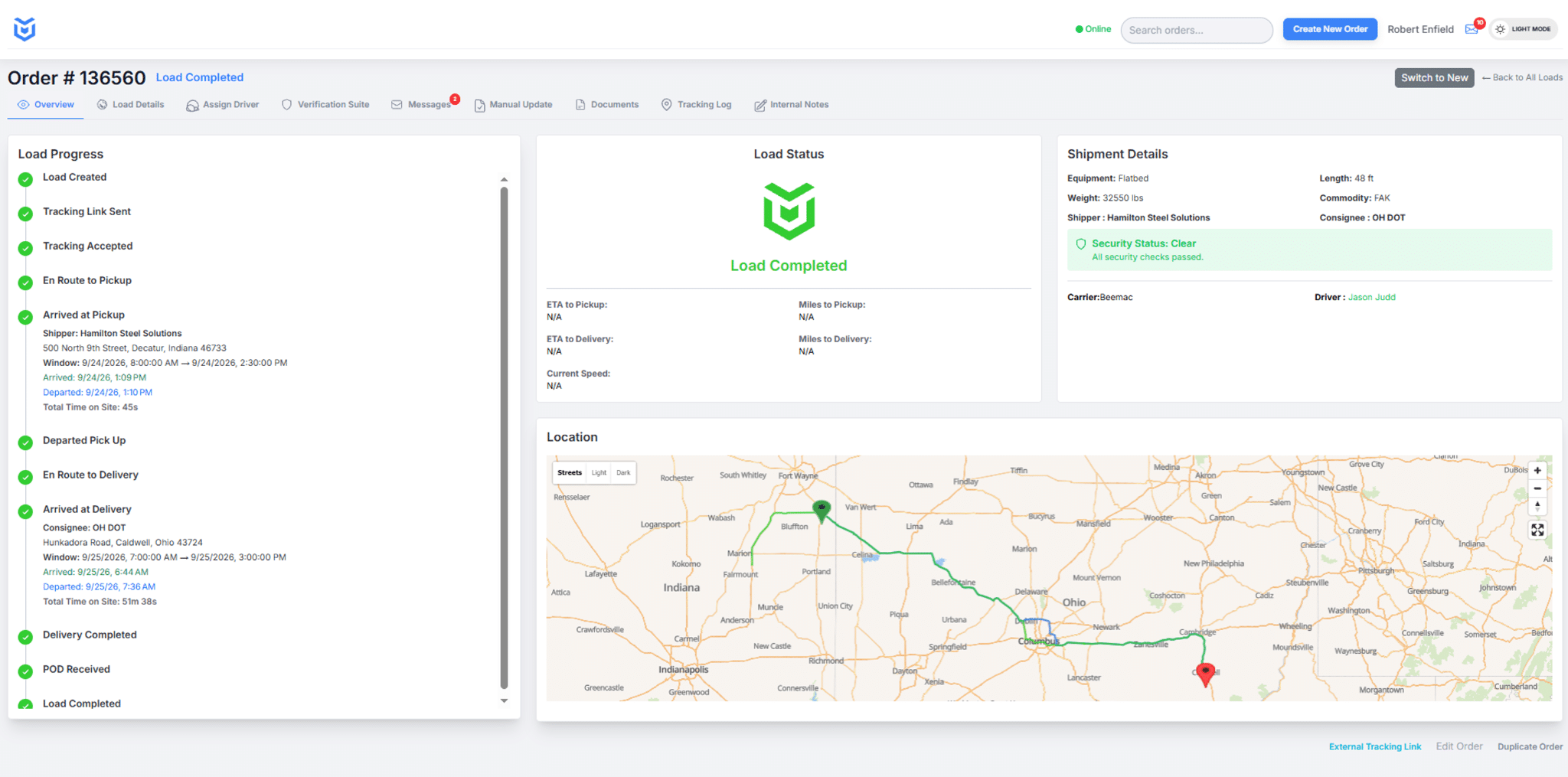
Review load progress, shipment details, verification information, and the route map in the CargoGuard workspace. Use the available records to give the next person handling the load a clear starting point.
3PL Freight Security Across Customers and Teams
3PL freight security connects shipment-level identity checks, location updates, and pickup and delivery evidence with a clear response process. For third-party logistics providers coordinating truckload freight, the aim is to know what was checked, what changed, and who needs to act next.
CargoGuard supports the verification and tracking part of that process. Keep your transportation management system (TMS), carrier-vetting procedures, and customer service commitments in place. The workflow below is an operating approach for your team, not a claim that every step happens automatically in the software.
Set the Pickup Standard Before Dispatch
Agree with each customer on the evidence needed before release: the assigned carrier, driver details, truck photos, pickup reference, and the person authorized to resolve a discrepancy. Tell the driver and pickup facility what to expect before the truck arrives.
Use driver verification to review license details, selfie checks, and truck registration. Compare the submitted information and truck and license plate photos with the assignment. Review available capture dates, times, and locations rather than treating an uploaded image as approval.
FMCSA recommends confirming carrier phone numbers through SAFER, comparing the arriving truck with the contracted carrier, and keeping driver and vehicle records. See its broker and carrier fraud guidance for the original recommendations.
When the driver or truck does not match, pause release approval under your procedures. Confirm the assignment with an independently verified carrier contact and the facility. Use the double brokering prevention workflow to identify the verification points, while keeping the release decision with authorized staff.
Make Shift Handoffs Actionable
Before another team takes over, review the shipment timeline and the latest available evidence. Record the load reference, last confirmed update, unresolved issue, assigned follow-up owner, and next action in your operational records. Carry forward the reason for an open concern, not just a status label.
Illustrative handoff: The day team receives a truck photo that does not match the pickup assignment. Its handoff tells the evening team what differs, which carrier contact was called, whether pickup remains on hold, and who can authorize release. The next team can continue the review instead of starting over.
This example describes a recommended operating procedure, not a customer case study or an automated CargoGuard approval rule.
Track Progress. Own the Follow-Up.
Use the freight visibility platform to check shipment status, the latest location timestamp, and available route history. When an update stops or a tracking concern appears, assign someone to contact the driver or carrier and report back. An old map position is not confirmation of the current location.
Review shipment alerts and GPS integrity checks alongside the load record. Device permissions and connectivity can affect updates. A gap or alert calls for investigation; it does not by itself prove fraud. Confirm supported notification channels, recipients, and follow-up settings during setup.
Give Each Customer the Right Update
Communicate what is confirmed, when it was confirmed, what remains unresolved, and when your team will follow up. A delay update should not imply that pickup verification or delivery paperwork is complete when it is not.
Before sharing driver documents, screenshots, or shipment records, confirm the recipient and the customer they represent. Review user access and customer-data boundaries with CargoGuard during the demo; do not assume a particular office hierarchy, role permission, or customer portal is included without checking the configuration.
Close the Load with Usable Evidence
Drivers can capture pickup photos and shipment documents through the mobile driver app. Keep bills of lading and proof of delivery with the correct shipment using document capture. Check readability, reference numbers, signatures, and any recorded delivery exception.
An arrival event and signed proof of delivery answer different questions. Before handing a load to customer service or accounting, identify missing paperwork and who will obtain it. Agree on retention, access, and export requirements before depending on a record for a later review.
Pilot One Workflow Before Expanding
Start with a defined customer, lane, or operations team. Walk through a normal load and exceptions such as a driver mismatch, a tracking interruption, and missing proof of delivery. Decide who acts, what evidence they need, and how the next team receives the handoff.
For integration planning, bring your TMS name, shipment identifiers, and data-exchange requirements. Review the freight tracking API with your technical team to confirm supported fields, event notifications, authentication, and testing. Agree which system owns each status before relying on automated updates.
During the pilot, measure verification completion, missing pickup evidence, tracking gaps, exception response time, and document completion. These are suggested evaluation measures, not published CargoGuard performance results. Explore the product walkthrough and broker workflow for related examples.
3PL Freight Security Questions, Answered
What does CargoGuard provide for 3PL freight security?
CargoGuard brings driver checks, shipment tracking, pickup photos, alerts, and delivery documents together for shipment review. Your team can use that evidence to investigate exceptions and coordinate follow-up with carriers and customers.
How is this different from tracking a truck on a map?
Location helps answer where the tracked device was at a given time. Driver information, truck photos, and shipment documents add context about the pickup and delivery. Neither a map position nor a passed identity check replaces your pickup-authorization process.
How should multiple teams hand off a shipment?
Use the load reference, latest confirmed update, outstanding concern, follow-up owner, and next action. Keep the handoff in your operational records and review the same shipment evidence. Confirm how your teams can access that information during setup.
Can we set different requirements for different customers?
Bring those requirements to the demo, including pickup photos, approval contacts, notification recipients, and document handling. Confirm how they can be supported in your account before rollout; do not assume every customer rule is an automatic software control.
What should we do when tracking updates stop?
Check the last update time and contact the driver or assigned carrier. Permissions or connectivity may interrupt tracking. Assign a follow-up owner, distinguish confirmed information from assumptions, and escalate unresolved concerns under your procedures.
Does CargoGuard replace our TMS or carrier vetting?
No. It supports shipment verification, tracking, and evidence review alongside those processes. Continue carrier onboarding, insurance checks, and release procedures, and confirm integration scope before connecting systems.
How should a 3PL evaluate CargoGuard before rollout?
Test one complete shipment workflow, including handoffs and exceptions. Review driver participation, evidence collection, access permissions, customer communication, and integration needs. Use your own pilot results to decide when to expand.
Can CargoGuard guarantee that no cargo theft or double brokering occurs?
No platform can guarantee that every attempt will be prevented. CargoGuard supplies additional information for your team to review. Effective use still depends on carrier checks, pickup controls, informed staff, and timely follow-up.
Bring Your 3PL Workflow. See It in Action.
Bring one customer requirement, one team handoff, and your TMS questions. Walk through driver checks, pickup evidence, shipment tracking, and delivery records with CargoGuard.