

Real-Time Freight Tracking Software
Follow the load. Spot the shipment that needs attention. CargoGuard brings location updates, load progress, driver details, and shipment records into one tracking workflow for freight brokers, 3PLs, and shippers.
Track Freight With Shipment Context
Real-time freight tracking software collects location updates and shipment events so logistics teams can follow a load between pickup and delivery. CargoGuard connects those updates with driver information, pickup photos, and delivery documents. Your team can review the latest reported position, the shipment’s progress, and the available records without treating a map pin as the whole story.
CargoGuard’s active-tracking workflow uses five-second location updates. Always check the timestamp of the latest received update. A planned update interval is not a guarantee that a new location will arrive when the device cannot provide or transmit one.
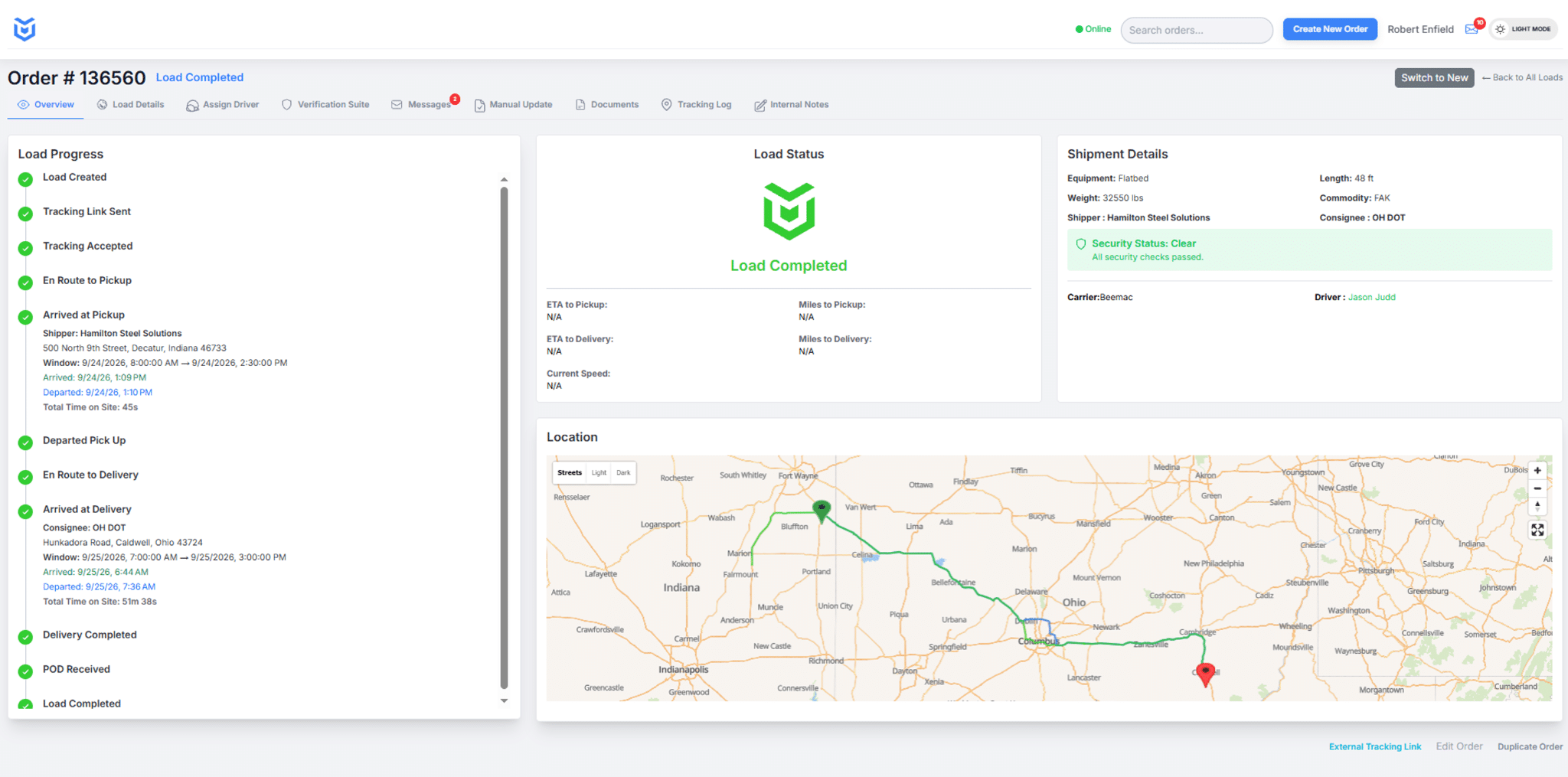
From Tracking Acceptance to Delivery Records
1. Confirm the driver is participating
Start with the assigned load and driver. Have the driver follow the CargoGuard mobile app prompts and confirm tracking has been accepted. Review required device permissions during setup. Creating a shipment or sending a tracking request is not the same as receiving location updates.
2. Review progress and follow up on exceptions
Open the load to review its latest reported location, timestamp, and status. Use the shipment timeline to understand the sequence of updates. When information is missing or a delay needs attention, contact the appropriate driver or carrier representative and coordinate the next customer update.
3. Close the load with the supporting documents
Review the delivery status and the documents submitted for the shipment. Keep the bill of lading and proof of delivery with the tracking history and pickup photos. A reported arrival at the delivery facility does not, by itself, confirm unloading or receipt of signed proof of delivery.
When a Location Update Is Missing
Distinguish the last known position from a confirmed current location. Check when the last update arrived and whether the driver has accepted tracking. Ask the driver to review the device’s connectivity and location permissions when safely parked; do not ask a driver to troubleshoot while driving.
Use your team’s escalation process when tracking cannot be confirmed. Tell the customer what is known, what still needs checking, and when the next update is expected. Missing data is a reason for follow-up, not proof that a load has been stolen or double brokered.
Turn Tracking Alerts Into Follow-Up
Use shipment alerts to identify changes that need review. During setup, confirm the supported events, notification channels, recipients, and the person responsible for responding. Make the next action clear rather than relying on a notification alone.
CargoGuard’s anti-spoofing checks flag signs of possible location manipulation for review. Compare concerns with the assigned driver, carrier details, pickup photos, and shipment history. An alert is not a finding of fraud, and a normal-looking route does not independently verify who has the freight.
Pair tracking with driver verification and your carrier-review process. See how those checks fit into a double brokering prevention workflow. CargoGuard supports your security procedures; it does not guarantee that every fraud or theft attempt will be prevented.
Fit Tracking Into Your Operation
Explore the freight broker tracking workflow to connect driver setup, tracking acceptance, exception review, and customer updates. For 3PL teams, define how shipment information is handed between team members. Shippers can discuss the visibility and delivery records needed for their operation.
Review CargoGuard’s freight and load tracking API with your technical team before planning a TMS connection. Confirm the supported fields and events, access requirements, and testing plan for your systems. For the broader view of tracking, verification, and evidence, explore the freight visibility platform.
Freight Tracking Questions, Answered
How often does CargoGuard update shipment locations?
CargoGuard’s active-tracking workflow uses five-second location updates. Review the latest received timestamp to judge how current the information is. Device connectivity and permissions affect whether a new position can be supplied; confirm the tracking requirements for your operation during setup.
Does sending a tracking request mean the shipment is being tracked?
No. Confirm the driver’s acceptance and check that location updates are arriving. CargoGuard’s mobile workflow requires driver participation and the appropriate device permissions. A sent request or an assigned carrier does not, on its own, establish active tracking.
What should a broker do when location updates stop?
Check the last received timestamp and tracking status, then contact the driver or carrier. Ask the driver to check connectivity and permissions only when safely parked. Follow your escalation procedure and distinguish the last known location from information you have confirmed more recently.
Does arrival at the receiver mean the shipment is delivered?
Not necessarily. Arrival, unloading, delivery confirmation, and receipt of a signed document are different steps. Review the shipment status and the required proof of delivery before closing the load under your company’s procedures.
Can GPS tracking alone verify the driver or prevent double brokering?
No. A location report does not independently establish the driver’s identity, pickup authorization, or physical custody of the freight. Combine tracking with driver checks, carrier verification, pickup procedures, and shipment records. Investigate conflicting information rather than treating a map position or an alert as conclusive.
Can CargoGuard tracking connect to our TMS?
Discuss your TMS, required shipment data, and integration workflow with CargoGuard. Request current API documentation and confirm the supported fields, events, access controls, and testing requirements. Compatibility and implementation work depend on the systems being connected.
What should a freight team look for in a real-time logistics tracking platform?
Look for frequent location updates, clear delay and exception alerts, simple driver participation, pickup and delivery evidence, and a practical path to your TMS or API workflow. CargoGuard combines tracking with driver verification, shipment alerts, pickup photos, and delivery records so brokers can review delays or route changes with the rest of the shipment context.
How can shipment verification help reduce freight fraud risk?
Tracking should not be treated as identity proof. A stronger workflow compares the assigned driver and vehicle with verification records and pickup photos, watches the active shipment for location or device concerns, and preserves delivery documents. CargoGuard brings those checks together so mismatches can be reviewed before and during transit.
See a Load From Start to Finish
Bring your tracking questions to a CargoGuard demo. Walk through driver participation, location updates, shipment history, and delivery records with our team.